Nexus One Nexus One
NEXUS ONE PLATFORM

Move Your Business Into One Connected Stack.

Connect the tools you already use, transfer your data, and run your business from one workspace. Start with a simple setup or let our team help you move everything over.

QuickBooks Twilio HubSpot ChatGPT Claude Google Workspace Microsoft Teams Stripe Shopify Wix WooCommerce Slack Website Spreadsheets
Connect · Import · Sync
NEXUS ONE WORKSPACE
CRM
Accounting
Comms
Bellum AI

Move In Your Way.

Start on your own or get guided help from the Nexus One team.

Self-Serve Transfer
Connect your tools, import records, and start building your workspace with guided steps.
Start Free Trial →
Assisted Setup
Need help moving data, setting up apps, or connecting workflows? Our team can help you migrate and configure your stack.
Contact Setup Team →
Hybrid Migration
Start with the basics yourself, then get help with advanced integrations, custom workflows, or team rollout.
Explore Platform →
CONNECTED DEVICES

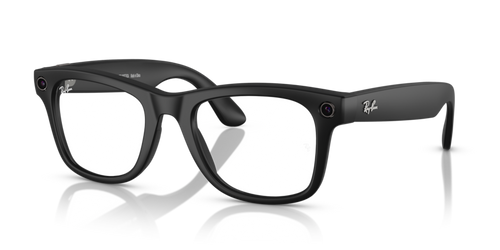
Connect Your Meta Glasses to Nexus One.

See your business through the HUD display — send invoices, check inventory, and see leads without touching your phone.
Meta Ray-Ban glasses Meta
Send Invoices
Fire off an invoice from the HUD without touching your phone.
Check Inventory
See stock levels at a glance while you’re on the floor.
See Leads
New leads show up in view the moment they come in.
HUD Display
Business data overlaid right where you’re looking.

Works With the Tools Your Business Already Knows.

Nexus One is built to connect with your existing business stack, so you do not have to rebuild everything from zero.

Accounting
QuickBooks Xero CSV imports Spreadsheets
Communication
Twilio Phone systems SMS Email Microsoft Teams Google Meet
CRM & Sales
HubSpot CRM imports Website forms Lead sources
AI Tools
ChatGPT Claude OpenAI Document AI
Google Products
Workspace Gmail Calendar Drive Sheets Ads
Microsoft Products
Microsoft 365 Outlook Teams OneDrive Excel
Commerce & Payments
Stripe Crypto payments POS systems Amazon Meta eBay
Marketing
Meta Ads Google Ads Social platforms SEO tools

From Scattered Tools to Nexus One in Simple Steps.

Bring in your customers, products, invoices, tasks, documents, and team data with guided imports and connected workflows.

1
Choose Source
Pick the tool or file you want to transfer from.
2
Connect or Upload
Connect an account, upload a CSV, or import documents.
3
Review Data
Preview customers, products, invoices, leads, or records before import.
4
Transfer to Nexus One
Move the data into the right apps and workspace.
5
Start Working
Your team can start selling, communicating, tracking, and automating.
Transfer Business Data Connect Tool Upload CSV Request Setup Help

Bring the Important Parts of Your Business With You.

Customers & Leads
Move contacts, companies, leads, and deal records.
Products & Services
Import catalogs, pricing, services, and sales items.
Invoices & Payments
Bring invoice history, payment records, and accounting data.
Tasks & Projects
Move active work, reminders, assignments, and project notes.
Documents
Upload contracts, receipts, files, policies, and training documents.
Team & Permissions
Set up employees, roles, departments, and access levels.
Website & Forms
Connect websites, forms, landing pages, and lead capture.
Communication
Connect calls, texts, emails, and customer conversation history where supported.

Why Switch From Separate Tools?

Separate tools create scattered data, duplicate work, and slow teams down. Nexus One brings the work into one connected system.

BEFORE NEXUS ONE
Too many disconnected apps
Manual copying between tools
Customer data spread everywhere
Teams working in silos
Missed follow-ups
Hard to see what is happening
More subscriptions to manage
AI tools not connected to real business workflows
AFTER NEXUS ONE
One connected workspace
Apps work together
Customer, sales, accounting, and communication data connected
Team activity visible
Bellum AI can help take action
Easier reporting
Flexible tools you can add as you grow
Less chaos, more control

Flexible Integration Options.

Native Apps
Use built-in Nexus One apps for CRM, accounting, POS, documents, HR, and more.
Direct Integrations
Connect supported tools like accounting, communication, AI, marketing, and productivity platforms.
CSV / Spreadsheet Import
Upload business data from spreadsheets and structured files.
API & Custom Connectors
Use custom integrations for advanced workflows, industry tools, or enterprise needs.
Assisted Migration
Let the Nexus One team help map, clean, import, and connect your business data.

Your Data Becomes Actionable With Bellum AI.

Once your business is connected, Bellum AI can help understand your records, surface insights, create tasks, follow up, and recommend next steps.

Explore Bellum AI
Understands Context
Bellum works from your connected Nexus One workspace.
Creates Work
Turn records, conversations, and reminders into action.
Finds Gaps
Spot missed follow-ups, stuck deals, overdue tasks, and workflow issues.
Suggests Improvements
Get recommendations based on what is happening in your business.

Ready to Bring Your Business Into Nexus One?

Start free, connect your tools, and move into one platform at your own pace. Need help? Our team can assist with setup and migration.

Need help moving over? Contact setup team.

Nexus One NEXUS ONE ANYWHERE

Your Business Command Center, On Your Smart Devices

Access customers, bookings, orders, tasks, messages, and team updates from anywhere — whether you're working from your phone today or stepping into hands-free business control with smart glasses. Stay connected at the shop, on the road, with a client, or in the field.